
Complete On-Page SEO Checklist for Beginners 2026
What is SEO and how does it work? SEO means Search Engine Optimization — it helps Google understand your page and rank it higher, and on-page SEO covers the changes you make directly on your site. For example, a page with a keyword-matched title and clear H2 headings routinely outranks a near-identical page missing both, even with the same content quality. This checklist covers:
- 10 core on-page SEO factors, from title tags to schema markup
- A real good-vs-bad example for each factor
- A free downloadable PDF checklist to reuse on every page
Many beginners feel confused by technical terms at first, but this guide keeps everything simple and easy to follow.
This on-page SEO checklist for beginners also explains the most important on-page SEO factors for 2026. You will learn ten clear, practical steps. Each step includes a real example, so nothing feels confusing. A free downloadable PDF checklist is also included near the end of this guide. Therefore, anyone can save it, print it, and reuse it for every future page. Start SEO for beginners in 2026 and optimize your very first page today
The list of on-page SEO factors in pdf file, attached at the end, is more than a simple checklist. It is a complete roadmap that explains how to improve your web pages so search engines can easily crawl, understand, and rank your content. You will also discover the latest on-page SEO practices that align with modern search trends and user expectations. If you want to Learn modern online skills and build a website that attracts consistent organic traffic, this guide will provide a solid foundation. Follow these 10 essential on-page SEO steps for beginners in 2026 to improve your rankings, increase your visibility, and grow your online presence with confidence.
On-Page SEO Factors Affect Rankings More Than Ever
The first reader of your online content, web page, or website is always Google’s algorithm itself. It reads your content in the same way as a human does. Furthermore, there are also some AI-powered features like Google AI Overviews which has now an ability to grab the answers and the required data directly from well-structured, optimized pages. Therefore, your onsite SEO best practices must be perfect if you want to appear in those AI answer boxes. Mastering on page SEO factors that affect rankings in 2026 is not just about keywords anymore; it includes content quality, page speed, structure, and trust signals
Why On-Page SEO Checklist Is Essential for Beginners to Rank in 2026
If you are new to SEO, an on-page SEO checklist pdf is one of the most valuable tools you can follow. It provides a clear roadmap for optimizing your website and helps you avoid common mistakes that can prevent your pages from ranking. Instead of guessing what search engines want, you can follow proven steps that improve your website’s visibility and user experience.
On-page SEO is the process of optimizing the elements on your website that you can control. It involves creating high-quality content that matches user intent while following search engine guidelines. This includes optimizing page titles, headings, URLs, meta descriptions, images, internal links, and overall content structure. Every improvement you make directly on your web pages helps search engines better understand your content and increases your chances of ranking higher.
Unlike off-page SEO, which depends on external factors such as backlinks and brand mentions, on-page SEO is completely under your control. By following a well-structured checklist, beginners can build a strong SEO foundation, create content that satisfies both users and AI-powered search engines, and improve their rankings with confidence in 2026.
Complete On-Page Optimization Checklist for Beginners in 2026
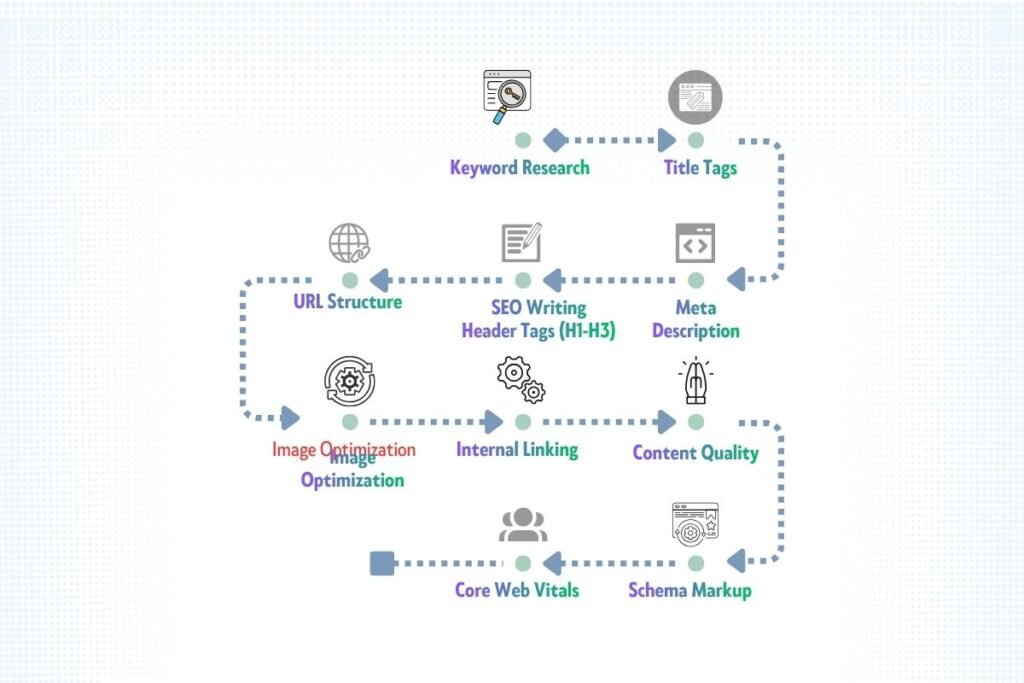
Here is the complete list of on-page SEO factors (elements) which are important for higher ranking for any kind of online business, content or website.
- Keyword Research
- Title Tags
- Meta Description
- Header Tags (H1 – H3, H4, H5, H6)
- URL structure
- Image Optimization
- Internal Linking
- Content & Intent (Content Quality)
- Schema Markup
- Core Web Vitals
On-Page SEO Factors: Impact vs. Effort at a Glance
Before diving into the details, one thing should be clear for you that all of the these on-page SEO factors (elements) are of great importance. As they have great impact on the online content, you should keep an eye on every element and its impact to get your website ranked. The following table shows SEO factors, their impact, your effort and priority for each SEO element.
| SEO Factor | Impact on Rankings | Effort Level | Priority |
| Keyword Research | ★★★★★ Very High | Medium | 🔴 Do First |
| Title Tag | ★★★★★ Very High | Low | 🔴 Do First |
| Meta Description | ★★★ Medium (CTR) | Low | 🟡 Important |
| Header Tags H1-H3 | ★★★★ High | Low | 🔴 Do First |
| URL Structure | ★★★★ High | Low | 🔴 Do First |
| Image Optimization | ★★★ Medium | Low | 🟡 Important |
| Internal Linking | ★★★★ High | Low | 🟡 Important |
| Content & Intent | ★★★★★ Very High | Low | 🔴 Do First |
| Schema Markup | ★★★★ High | Medium | 🟡 Important |
| Core Web Vitals | ★★★★ High | High | 🟢 Next Step |
Key Steps of On-Page SEO in 2026
Let’s walk through each step of this simple on-page SEO checklist in detail which will helpful for small businesses, bloggers, and online content creators. Every step includes a real example and a hands-on practice activity so you can apply it immediately.
Step 1: Keyword Research Before You Write a Single Word
Do you wonder what a keyword is? Remember, a keyword can be a single word or a phrase which people use in the search engines to find their desired data, information or content. It is essential to base your content on well-researched keywords.
In fact, many high-ranking websites get the high spot in search engines because of the right keyword. Keyword research gives you accurate data about what people are looking for or what they want. Skipping this step is the number one mistake beginners make.
How to Find the Right Keyword for Your Page
The first step in creating SEO-friendly content is choosing a clear niche or topic. Once you know what you want to write about, use the best keyword research tools to find the exact words and phrases that people are searching for. At the same time, understand the user’s search intent so you can create content that answers their questions. As a beginner, focus on long-tail keywords—search phrases with three or more words. These keywords usually have less competition, making them easier to rank for and more likely to attract the right audience.
After selecting your target keywords, perform a gap analysis of competitors. This helps you discover the keywords and topics your competitors have not covered well. By filling these content gaps with useful, high-quality information, you can reach more users, improve your search rankings, and gain a competitive advantage in your niche.
Placement of keywords in Blog Post for SEO
After keyword research, most of the content creators think that the job has been done, and they make mistakes here. The next step is to use those keywords rightly in the content. You can follow the golden rules of keywords placement in the online content, web page or blog post for SEO:
- Title tag: Using title tag is all about the front face of your blog or content, so you should use your primary keyword within the first 60 characters.
- First 100 words: Now, the story begins here by using focus keyphrase (primary keyword) in the first 100 words of introduction naturally and semantically.
- H1 and H2 headings: The next important rule is to Include keyword variations in your main headings.
- Body content: Every keyword should have the density of 1-2%. Above all, do not force the keywords in the content.
- Image alt text: At least, one image of your page should have the primary keyword (focus keyphrase) as an alt text in the image description.
- URL slug: The slug is the specific address of your page or content which leads a user to your page. Therefore, keep it short and include the primary keyword.
Step 2: Title Tag Optimization — Your Number One CTR Booster
The use of title tag can be a game changer for beginners. It appears as a clickable blue headline in Google search results. It is one of the most powerful on page SEO factors because it directly controls your click-through rate. A great title attracts readers; a weak one gets ignored completely.
Rules of Title Tags in SEO
- It must be under 60 characters so Google does not cut it off in results.
- At the beginning of title, you have to use your primary keyword.
- Additionally, the use of numbers, power words, or brackets to increase clicks; for example, you can use: “10 Steps”, “Free Guide”, “[Updated 2026]”.
- Every page should have its unique title. Avoid using the duplicate titles across your site.
On-Page SEO Examples: Good Title Tag vs. Bad Title Tag
For example, we want to write a title tag for guest posting. Let’s compare its good and bad example.
| Good Example | Bad Example |
| How to start guest posting in 2026: The Best strategy for beginners | Guest posting: The fastest way to rank in 2026 |
Step 3: Meta Description — Small Text, Big Impact
To clarify, a short paragraph below the title tag in search result play a vital role to appeal the online visitor. In other words, this paragraph is actually a short introduction of your post. By reading the meta description, the user decides whether he will visit your page or not. According to Google, it is not a direct ranking factor.
In fact, it controls your CTR. If the meta description contains the solution of user’s problem, he will definitely click on the link to visit; otherwise, he will ignore it complete. In this way, it conveys the user’s visit as a signal of good quality to Google. Hence, you may think of it as a mini-advertisement for your page.
Rules of Meta Description for A Blog in 2026
If you want to turn a user into a visitor of your content, you will have to obey the following rules:
- The meta description of your blog or content should have 150 to 160 characters only.
- It must have your primary keyword naturally in the beginning
- Write it like an advertisement: tell readers what they will get and why they should click now.
- End with a clear call-to-action such as “Learn how”, “Get the free checklist”, or “Start today” etc.
- Here, make sure your meta description directly answers the user’s question in one or two sentences. AI systems often extract this text for quick-answer boxes.
Examples:
For example, you are a page about how to start blogging in 2026. Here are the good and bad examples for comparison:
| Good Example | Bad Example |
| Learn how to start Blogging from beginners. A Step-by-step guide for beginners to start in 2026. Are you ready? | We teach here beginners to start blogging in 2026. Start with this guide. |
Step 4: How to Use Header Tags H1, H2, H3 for SEO the Right Way
By the use of proper heading or header tags, your content appears like a well organized content. In other words, it looks like chapters in a book. They help both readers and search engines understand what each section have. Above all, the proper structure of H1, H2, H3 shows the hierarchy of the topics what your blogs covers.
To cut the story short, the use of SEO header tags brings the highest-impact, takes your less effort, and helps the search engines identify the main purpose of the blog post.
H1 Tag Rules: One Per Page, Always Focused on Your Topic
- Make sure that there is only one H1 tag per page. Moreover, it must contain your primary keyword. Don’t use H1 tag twice or more than one.
- H1 tag should be descriptive and unique. In other words, your H1 should summarize the entire page.
- Avoid using H1 as a generic heading like “Welcome” or “Home Page”. It should represent the main intent and purpose of the page naturally.
Structuring Your Content With H2 and H3 for Readability and Rankings
Additionally, H2 tags are your main section headings. Particularly, each H2 of the page should convey one major intent, topic or step. Meanwhile, H3 tags sit inside H2 sections as subtopics or subheadings. The purpose of these subheadings is to create a sequence and hierarchy of the concept. It also helps Google to understand and categorize your page content.
On the basis of this hierarchy, Google gets signals about what topic your page covers. Furthermore, it greatly improves your chances of appearing in featured snippets.
Correct Use of H1, H2, And H3 in A Blog
Here is the google example of the correct hierarchy of header tags. You can follow the same hierarchy and heading structure to improve your rankings in search engines.
Step 5: SEO-Friendly URL Structure Guide for Beginners
The URL for a page, blog, or content is like a street address. As we cannot meet a person without correct address, online users cannot find your content in the same way unless it has a unique URL with the right keyword. Hence, a clean, short URL helps Google understand the content instantly. Finally, it is a small but critical part of any complete on site seo guide.
URL Slug Optimization Rules
Moreover, the rules for URL slug optimization are very simple and clear. You have to follow them for better ranking. You must:
- Keep slugs short: three to five words maximum.
- Include your primary keyword in the slug.
- Use hyphens to separate words, never underscores.
- Remove stop words like “a”, “the”, “and”, and “in” from the slug.
- Use only lowercase letters in all URLs.
Clean URLs vs. Messy URLs Examples:
| Good Example | Bad Example |
| yoursite.com/on-page-seo-checklist-beginners | yoursite.com/on, page, SEO-checklist to improve page SEO |
Step 6: Content Quality and Search Intent — The Heart of On-Page SEO
Above all, only on-page optimization will not help to improve rankings if the quality of the content is not up to the mark and does not fulfill users’ requirement. Google calls it a mismatch to users’ search intent. In fact it is the foundation of best on page SEO practice in 2026.
How to Match Search Intent in 2026
In SEO, there are four basic types of search intent. Based on these intents, Google defines the core purpose of your content. Therefore, it is important to set keywords according to the purpose of your web page, blog, or post. Following are the four types of search intent:
- Informational: It shows that the user wants to know or learn. Example: “What is on-page SEO?”
- Navigational: Here, the user is looking for a specific site. Example: “Best SEO website”
- Commercial: This intent clarifies that the user is doing his research before his final action. Example: “best paid SEO tools 2026”
- Transactional: The words of search shows signals Google that user is now ready to take action. Example: “SEMrush vs Ahrefs”
On-Page SEO Tips for AI Search Optimization: How Google AI Overviews Read Your Content
Google’s AI Overviews are changing how people find information online. This feature is designed to extract answers from well-structured, high-quality content and present them directly in search results. That is why following an on-page SEO checklist is more important than ever. Well-organized content has a better chance of being understood by both search engines and AI-powered search systems.
To improve your chances of appearing in AI search results, learn the methods of content optimization by following these best practices:
- Write short, easy-to-read paragraphs with a clear purpose. As a general rule, keep each paragraph under 150 words.
- Use question-based H2 and H3 headings that match the questions users commonly search for online.
- Answer the main question within the first one or two sentences of each section to help both readers and AI quickly understand your content.
- Organize information with bullet points, numbered lists, and tables whenever appropriate, as AI systems can easily identify and extract structured content.
- Use simple language, relevant examples, and logical headings to make your content more helpful, readable, and trustworthy.
By applying these techniques, you can create content that is easier for users to understand and more likely to be featured in AI-powered search results
Content Quality Rules for Beginners: What Makes a Page Rank?
Google has some specific rules to justify the quality of content. Following these rules can help a page to rank higher. To meet content quality requirements, you should:
- Discuss and cover the topic fully. In other words, your content should be able enough to answer every related question of the users.
- Include clear E-E-A-T signals. These signals show Experience, Expertise, Authoritativeness, and Trustworthiness.
- Avoid using duplicate content. For this purpose, do your own research, use real examples, and put accurate data to stand out from every competitor.
- Write in active voice, and the whole content should convey easy and understandable ideas.
Step 7: Internal Linking — The Underrated On-Page SEO Factor
This step is an underrated on-page SEO factor. Internal links connect one page on your site to another within the same site. These links help Google discover your content, distribute page authority, and keep readers engaged longer.
This linking setup also helps Google crawler to crawl your pages efficiently. Furthermore, most beginners ignore them completely. Due to this mistake, they loose their ranking in Google search engines. Above all, this is a costly mistake.
Rules of Internal Linking for Small Business Sites in 2026
- There should be three to five internal links per blog post or per page.
- The anchor text should be natural and descriptive. Using natural anchor text clearly tells readers and Google what the linked page covers.
- Link to your most important pages frequently — your pillar pages and core service pages.
- Avoid using generic words or text like “click here” as anchor text. These types of anchor texts provides zero context to search engines.
Example
Suppose you have a pillar page that serves as a roadmap to SEO practices in 2026, with three related blog posts on different SEO topics. Link from the pillar to each post with descriptive anchor text, and link each post back to the pillar. This structure helps search engines crawl your site efficiently and distribute authority across your important pages.
Step 8: Image Optimization in SEO
Clear and relevant images enhance the credibility of your content. Additionally, images make the content more engaging and easier to understand. However, unoptimized images with low quality slow down page speed and directly hurt site’s rankings.
Furthermore, AI search tools now have an ability to read images through alt text. On the other hand, strong on-site optimization of images also helps it appear in visual search and AI-generated results.
Rules of Image Optimization for On-Page SEO in 2026
- It is essential that you compress all images before uploading. Moreover, you can use WebP format for the best file size and quality balance.
- All the images should have descriptive alt text in their description. In addition to the alt text, you must include your keyword naturally in the image description.
- The file name should also be relevant. For example, “on-page-seo-checklist-2026.webp” instead of “IMG_2043.jpg”.
- If the captions of images are helpful for the user, you must add them so that the content reader should understand them clearly. The use of captions improve accessibility and increase time-on-page.
- The dimensions and placement of your image should be accurate in the content, so the browser does not need to resize them on load.
- Avoid using inverted commas before and after the alt text in image description.
Examples
| Good Example | Bad Example |
| on-page SEO checklist infographic for beginners 2026 — 10 steps | “image1 about SEO” or no alt attribute at all |
Step 9: Schema Markup — The Secret On-Page SEO Tactic
Here, it is essential to understand the purpose of schema markup. Actually, it is structured layout of your page with the help of which you tell Google about the identity of the page.
This schema helps search engines understand your content at a deeper level. Particularly, schema markup is the secret on-page SEO tactic that most beginners never use. Above all, it gives your web page a real edge over competitors who do not know about it.
Types of Schema Markup for On-Page SEO in 2026
- Article Schema tells Google that your page is a blog post or news article.
- FAQ Schema makes your FAQ section appear as expandable questions directly in Google results.
- Local business checklist helps you make your business prominent in your city or area where you want your business to grow.
- How-To Schema is perfect for step-by-step guides exactly like this one.
Example
Do you wonder how schema helps you appear in Google AI overview? If your FAQ section has proper FAQ schema, then Google can extract those questions and answers to bring them in search results or even inside AI Overviews. As a result, it increases the visibility of your content directly in the search engines and AI overviews.
For this purpose, you do not need to rank in position one. So, it is one of the best free on-page optimization services you can do yourself quickly.
Practice Activity
If you use the Yoast SEO plugin, it can automatically add Article schema. For FAQ schema, use the Yoast FAQ block inside your WordPress editor. Alternatively, generate schema code using Google’s free Structured Data Markup Helper and paste it into your page header.
Step 10: Core Web Vitals and Mobile Optimization
The role of core web vitals is to measure how fast and user-friendly your page is. Google uses these scores as direct ranking signals. Additionally, since Google indexes mobile versions of pages first, mobile optimization is now completely non-negotiable. This step completes your on-page optimization foundation.
Do Core Web Vitals Affect Rankings in 2026?
Yes, core Web Vitals directly affect rankings. There are three key metrics of core web vitals which you should consider while optimizing your page or content:
• LCP (Largest Contentful Paint): It tells how fast your main content loads. Your page should load under 2.5 seconds.
• INP (Interaction to Next Paint): Here you have to consider how quickly your page responds to clicks. It should be under 200 milliseconds.
• CLS (Cumulative Layout Shift): The most important point is to understand how much your layout jumps while loading. It should be under 0.1.
Mobile Optimization Rules: Why Google Ranks Mobile-First Pages Higher
There is need to understand this optimization rule. Google prefers mobile-first optimization for better ranking. For this purpose, you must:
- Use a responsive theme that adjusts automatically to any screen size.
- Set font size to at least 16px for comfortable reading on small screens.
- Make buttons and links large enough to tap, minimum 44px height.
- Avoid pop-ups that cover content on mobile devices. As a result, Google penalizes these.
How to Improve Your Core Web Vitals?
- Install a caching plugin like WP Rocket or W3 Total Cache.
- Use a fast hosting provider — cheap shared hosting often causes slow LCP scores.
- Remove unused CSS and JavaScript using a plugin like Asset CleanUp.
- Enable lazy loading for images so they only load when a visitor scrolls to them.
Complete On-Page SEO Checklist for Small Business: Quick Reference Table
Here is a complete on page SEO checklist to confirm your page is fully optimized before you hit publish. These on-page basics tie directly into 2026 SEO trend that businesses can’t ignore, including E-E-A-T and structured data. Before publishing your content, take some time to review your page or content, and tick each item one by one:
| Category | Checklist Item | Done? |
| Keyword | Primary keyword in title, H1, and first 100 words | ☐ |
| Keyword | Secondary keywords placed naturally throughout content | ☐ |
| Keyword | No keyword stuffing — density stays at 1-2% | ☐ |
| Content | Content matches search intent (info / commercial) | ☐ |
| Content | Original, useful, expert-written content | ☐ |
| Content | E-E-A-T signals included (experience, expertise) | ☐ |
| Technical | Title tag under 60 characters with primary keyword | ☐ |
| Technical | Meta description 150-160 characters with CTA | ☐ |
| Technical | One H1 tag per page only | ☐ |
| Technical | URL slug is short, lowercase, and keyword-rich | ☐ |
| Technical | Core Web Vitals pass (LCP under 2.5s, CLS under 0.1) | ☐ |
| Images | All images have descriptive, keyword-relevant alt text | ☐ |
| Images | Images compressed (WebP format preferred) | ☐ |
| Links | 3-5 internal links per post with descriptive anchor text | ☐ |
| Links | 1-2 relevant, authoritative external links added | ☐ |
| Schema | FAQ or Article schema added via Yoast or JSON-LD | ☐ |
Free On-Page SEO Checklist PDF Download
How to Audit On-Page SEO Results
Let’s talk about how to audit on-page SEO. It is important to track your results after completing this on page SEO checklist. Optimization without measurement is simply guesswork. Fortunately, several free tools make tracking straightforward and reliable.
3 Signs Your On-Page SEO Is Working
- At first, If Impressions are increasing gradually, it means Google is showing your page more frequently in search results.
- Secondly, when average position is improving, your page is climbing higher in the rankings week by week.
- Thirdly, if clicks are increasing, it shows more people are clicking through from search results to your page.
3 Red Flags to Watch
- Pages not indexed: Check the Coverage report in GSC. Google may not have crawled your page yet.
- High bounce rate: If visitors leave instantly, your content likely does not match their search intent.
- No movement after 3 months: Revisit your keyword choice — the competition may simply be too strong for a new site.
Conclusion
On-page SEO delivers the best results when it is supported by a strong technical foundation. Before applying this checklist, complete an audit for technical SEO to make sure your website is fast, secure, and easy for search engines to crawl.
This on-page SEO checklist for beginners in 2026 gives you a clear roadmap to improve your rankings step by step. Remember, on-page SEO is not a one-time task. Keep updating, optimizing, and improving your content as search engines and AI continue to evolve. Start with these fundamentals today, and you will build a strong foundation for long-term SEO success.
Frequently Asked Questions
SEO stands for Search Engine Optimization. It is the process of improving your website so search engines like Google can find, understand, and rank it higher. SEO works through two main areas: on-page SEO, which covers your content and structure, and off-page SEO, which covers backlinks and authority. Together, these signals tell Google your page deserves a top ranking.
A complete on-page SEO checklist includes keyword research, title tag optimization, meta descriptions, proper header tags, clean URLs, quality content, internal linking, image optimization, schema markup, and page speed. Following these steps in order helps beginners avoid missing any critical ranking factor, and it keeps your workflow organized for every new page you publish.
The most important on-page SEO factors include keyword placement, title tags, header structure, content quality, internal links, and image alt text. Search engines use these factors together to understand what your page is about. Getting even a few of these right significantly improves your chances of ranking higher, especially when combined consistently across every page on your site.
Yes, this guide includes a free, downloadable on-page SEO checklist for beginners in PDF format. It condenses every step covered in this article into one printable page. Beginners can keep it open while writing, tick off each item before publishing, and reuse it for every future blog post without needing to search for the steps again.
You can find on-page SEO for beginners in PDF format directly inside this guide, available as a free download near the end of the article. It includes all ten steps in a simple checklist layout, making it easy to print, save on your phone, or share with a team member who is also learning SEO fundamentals.